Roblox clothing templates for shirts, pants, and T-shirts
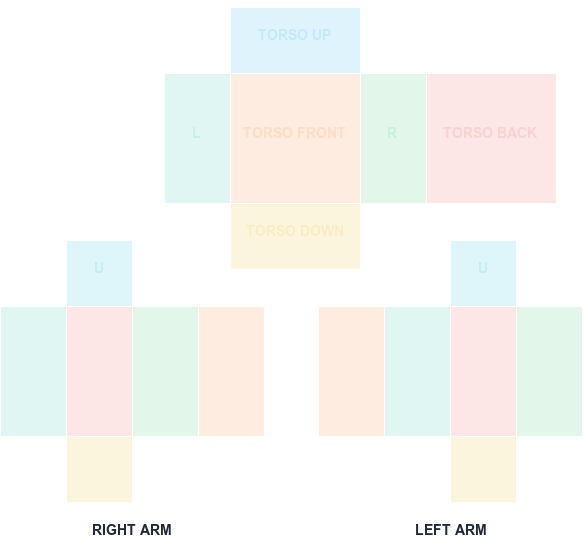
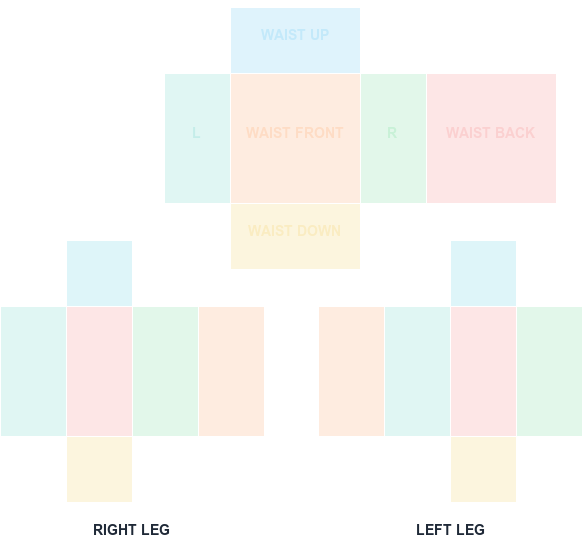
Choose the asset type first. Shirt and Pants use full wrap templates, while a classic T-shirt uses a square image on the torso front.
585 × 559 PNG
Preview and align your shirt PNG
100% in-browser
What this template is for
Classic clothing is 2D image-based clothing for block avatars. Shirt and Pants artwork is split into UV faces; T-shirt artwork is a single front graphic. These are different from layered 3D clothing assets.
How to use it
Pick the matching download card, edit without changing its canvas, and use transparency for uncovered areas. Preview wrapped textures here and confirm the final asset type in Creator Dashboard.
Step by step
1
Decide the asset type first
Shirt, Pants, and classic T-shirt are three different assets with different canvases. Picking the wrong one is the most expensive mistake, since the upload fee is charged either way.
2
Download the matching template
Shirt and Pants both use 585x559 wrap sheets with different UV islands. A classic T-shirt uses a 128x128 square front graphic instead.
3
Edit without changing the canvas
Whichever type you chose, keep the dimensions locked and use transparency for areas that should stay uncovered.
4
Preview wraps here, confirm type at upload
Use the previewer for Shirt and Pants sheets, then double-check the asset type in Creator Dashboard before publishing.
Sizes and upload facts
Key numbers for this template
Shirt / Pants canvas
585 × 559
The classic wrap-around clothing sheet.
Classic T-shirt
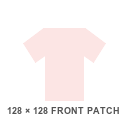
128 × 128
A single square graphic on the torso front.
Largest UV panel
128 × 128
Torso and leg front/back faces.
Upload fee
R$10
Per classic clothing asset.
Common mistakes
Confusing classic clothing with layered 3D clothing
Classic clothing is 2D image-based and wraps block avatars. Layered 3D clothing is a separate modeled asset pipeline — the templates on this site do not apply to it.
Mixing up Shirt and Pants sheets
Both are 585x559, so neither file complains at upload. The UV islands differ, so the wrong choice wraps artwork onto the wrong limbs.
Using a T-shirt square in a Shirt slot
A 128x128 square uploaded as a Shirt stretches across the torso and arms instead of sitting flat on the chest.
FAQ
Questions before you upload
Which Roblox clothing template should I use?
Use Shirt for torso and arms, Pants for waist and legs, and T-Shirt for a single front-torso graphic.
Do these templates make layered clothing?
No. They are for classic 2D clothing. Layered clothing uses a different 3D creation workflow.
Can I edit the templates on a phone?
Any editor that preserves PNG transparency and exact pixel dimensions can work, but a layer-based desktop editor makes UV seams easier to manage.
What are the Roblox clothing template sizes?
Classic Shirts and Pants both use a 585x559 canvas. Classic T-shirts use a 128x128 square. Layered 3D clothing is a separate modeled pipeline with different requirements.
What is the difference between classic and layered clothing?
Classic clothing is a 2D texture wrapped onto block avatars using these templates. Layered 3D clothing is an actual 3D model that conforms to different body types and is not made from these PNGs.
Can I sell Roblox clothing I make?
Roblox has changed the requirements around selling clothing over time, including membership and marketplace rules. Check the current Creator Dashboard terms before planning to sell.
Blank canvas files
Download a template at the right size
Start with a transparent, Roblox-compatible guide. Shirt and pants wrap around the avatar; the classic T-shirt is a 128×128 front patch.
585 × 559 PNG
Classic Shirt UV Template
585×559 torso and arm layout with color-coded faces.