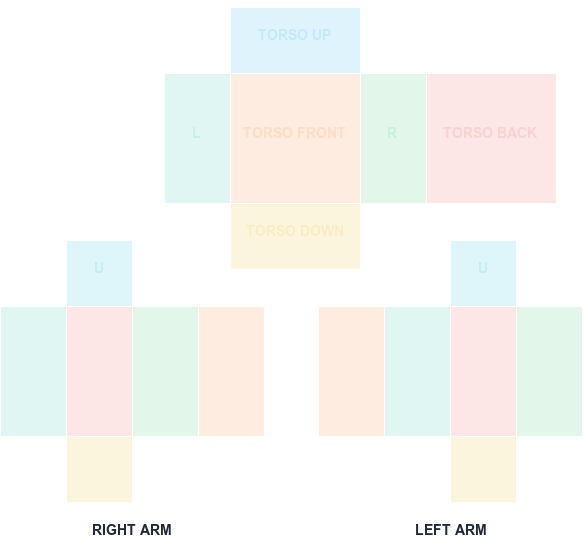
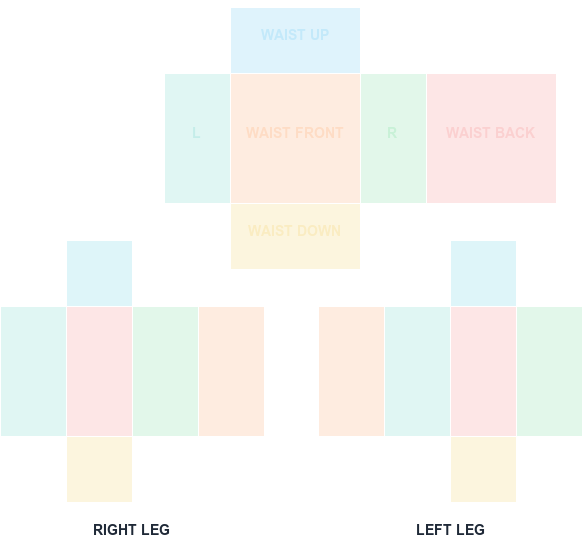
Keep the full classic Shirt or Pants canvas at exactly 585 pixels wide by 559 pixels high. Resizing can shift panel boundaries and produce bad seams.
585 × 559 PNG
Preview and align your shirt PNG
100% in-browser
What this template is for
Large front and back panels are 128×128; torso sides and limb faces use 64×128; top and bottom torso panels use 128×64; limb caps use 64×64. The complete arrangement occupies 585×559.
How to use it
Check Image Size in your editor before export, use a non-destructive layer workflow, and avoid automatic social-media compression. The exported file should still report 585×559.
Step by step
1
Confirm the canvas reads 585x559
Before anything else, open Image Size in your editor. Classic Shirt and Pants sheets must be exactly 585 pixels wide by 559 pixels high.
2
Learn which panel is which size
Torso and leg front/back panels are 128x128. Sides and limb faces are 64x128. Top and bottom torso panels are 128x64, and limb caps are 64x64. Knowing these prevents artwork landing across a boundary.
3
Work non-destructively
Use layers and masks rather than transforming the base image. Every destructive scale operation risks nudging the panel grid out of alignment.
4
Re-check dimensions after export
Export, then reopen the exported file and confirm it still reports 585x559. Compression tools and messaging apps frequently resize without warning.
Sizes and upload facts
Key numbers for this template
Full canvas
585 × 559
Classic Shirt and Pants sheet size.
Front / back panels
128 × 128
The largest usable design areas.
Side and limb faces
64 × 128
Narrow wrap-around panels.
Top / bottom caps
128 × 64
Shoulder and hip surfaces; 64 × 64 for limb caps.
Common mistakes
Rounding to a 'nicer' size
512x512 and 600x600 are not valid classic clothing canvases. The panel boundaries are defined against 585x559 and shift the moment you rescale.
Sending the file through a chat app
Messaging and social platforms recompress images and often resize them. Transfer the PNG via a method that preserves the file byte-for-byte.
Scaling artwork to fill a panel edge to edge
Artwork that touches a panel boundary tends to bleed onto the adjacent face once wrapped. Leave a small margin inside each panel.
FAQ
Questions before you upload
Can I upload a 585×560 shirt image?
Use exactly 585×559 for the classic wrap template. An extra or missing row can invalidate or misalign the expected layout.
Why are the panel dimensions multiples of 64?
The classic avatar surfaces use 64-pixel and 128-pixel face blocks arranged within the larger upload canvas.
Is a classic T-shirt also 585×559?
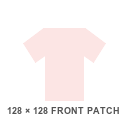
No. It is a square front graphic rather than a wrap map. This site provides a 128×128 T-shirt canvas.
What size is a Roblox shirt template in pixels?
Classic Shirt and Pants templates are 585x559 pixels. A classic T-shirt is different — a 128x128 square front graphic rather than a wrap-around sheet.
Why is the Roblox template 585x559 and not square?
The sheet packs a set of rectangular UV panels — torso and limb faces at 128x128, 64x128, 128x64, and 64x64 — and 585x559 is the size that arrangement occupies.
What happens if I upload the wrong size?
Roblox may reject the file, or accept it and stretch the artwork across mismatched panel boundaries. Either way the R$10 upload fee is spent.
Blank canvas files
Download a template at the right size
Start with a transparent, Roblox-compatible guide. Shirt and pants wrap around the avatar; the classic T-shirt is a 128×128 front patch.
585 × 559 PNG
Classic Shirt UV Template
585×559 torso and arm layout with color-coded faces.