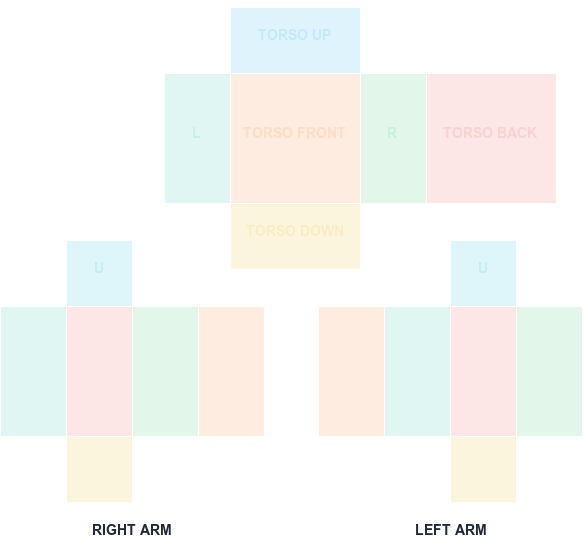
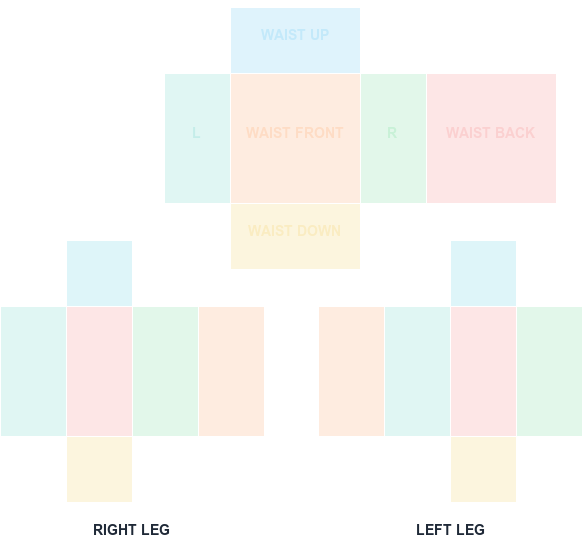
This lightweight maker focuses on the step that causes the most failed uploads: getting artwork onto the correct classic shirt canvas and checking each body face.
585 × 559 PNG
Preview and align your shirt PNG
100% in-browser
What this template is for
The tool is an alignment and preview workspace, not a paint editor. It normalizes your selected PNG to a 585×559 output, optionally draws UV guides, and shows six useful face crops.
How to use it
Create artwork in your preferred editor, choose the PNG here, switch between aligned stretch and contain modes, inspect the face preview, hide guides, and export a clean file.
Step by step
1
Create artwork in your preferred editor
This tool is an alignment and preview workspace, not a paint program. Produce the artwork wherever you are comfortable, then bring the PNG here.
2
Load the PNG into the previewer
Select your file above. Nothing is uploaded to a server — the canvas work happens entirely in your browser, so unreleased designs stay on your machine.
3
Compare stretch and contain modes
Switch between fit modes to see how a differently sized source maps onto the 585x559 output. This makes it obvious when a source image has the wrong aspect ratio.
4
Inspect the face crops, then export
Check the six face previews for seam breaks and edge bleed. Turn guides off and export a clean 585x559 PNG ready for upload.
Sizes and upload facts
Key numbers for this template
Canvas size
585 × 559
The full classic Shirt sheet. Never resize it.
Torso front / back
128 × 128
The two widest panels — your main design area.
Sides, arm faces
64 × 128
Narrow panels that wrap the torso sides and limbs.
Upload fee
R$10
Charged per classic clothing asset at upload time.
Common mistakes
Expecting a full paint editor
There are no brushes or layers here. The tool solves alignment and preview — the step where most failed uploads actually originate.
Exporting with guides enabled
Guides are a preview aid. Toggle them off before the final export or the colored boundaries ship with your design.
Skipping the Studio test
A flat preview cannot show how the texture behaves on a moving rig. Test in Studio before spending the R$10 upload fee.
FAQ
Questions before you upload
Is this Roblox shirt maker free?
Yes. Previewing, downloading templates, and exporting the aligned PNG are free and do not require an account.
Can I draw directly in the maker?
Not yet. The tool is designed for alignment, UV inspection, and export after you create art in a layer-based image editor.
Does the maker publish the shirt to Roblox?
No. It only creates a local PNG. You control testing and submission through Roblox Studio and Creator Dashboard.
Does this Roblox shirt maker upload my artwork?
No. The image is processed locally in your browser using canvas APIs. The file never leaves your device, which is why the previewer works without an account.
Can I make a full shirt design here?
You can align, preview, and export a correctly sized sheet. For drawing the artwork itself, use a dedicated image editor and bring the PNG back here to check the mapping.
Is a Roblox shirt maker free to use?
This previewer and its template downloads are free. Roblox's own R$10 per-asset upload fee still applies when you publish the finished item.
Blank canvas files
Download a template at the right size
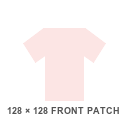
Start with a transparent, Roblox-compatible guide. Shirt and pants wrap around the avatar; the classic T-shirt is a 128×128 front patch.
585 × 559 PNG
Classic Shirt UV Template
585×559 torso and arm layout with color-coded faces.