Roblox shirt template: preview and download the 585×559 PNG
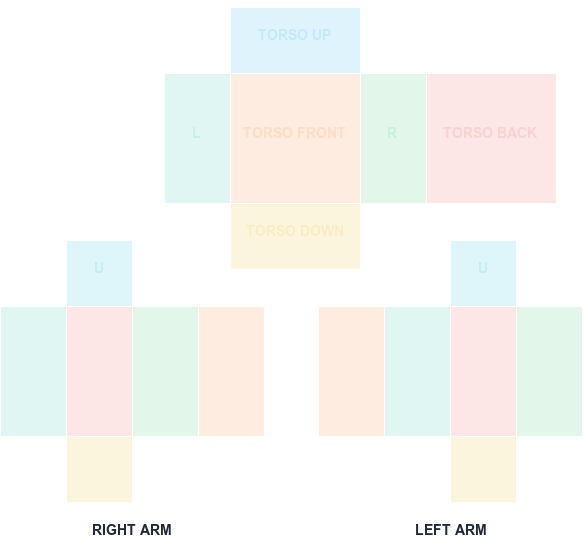
Start from a color-coded classic shirt UV map or drop in your finished PNG. The browser preview separates the torso and arm faces so seams are easier to check.
585 × 559 PNG
Preview and align your shirt PNG
100% in-browser
What this template is for
A classic shirt uses one 585×559 image to wrap the torso and both arms. The wide 128×128 panels are the torso front and back; 64-pixel panels cover the sides, tops, bottoms, and arm faces.
How to use it
Download the shirt guide, paint beneath the labels in an image editor, export PNG, and open it here. Turn off the guide before export, inspect the six face crops, and test the result on a block rig in Studio.
Step by step
1
Download the labeled shirt guide
Grab the 585x559 guide from the download cards below. The colored rectangles mark which part of the sheet becomes the torso front, back, sides, and each arm face, so you are never guessing which square wraps where.
2
Paint underneath the guide layer
Open the PNG in any editor that supports layers and keep the guide pinned on top at reduced opacity. Paint on layers beneath it. This keeps the boundaries visible while you work without baking them into the artwork.
3
Preview every face before exporting
Load your work-in-progress into the previewer on this page. It splits the sheet into the six face crops so you can check that shoulder seams line up and nothing important lands on a panel edge.
4
Export at exactly 585x559, then test in Studio
Hide the guide layer and export a transparent PNG at the original dimensions. Drop it onto a block rig in Studio before you spend the R$10 upload fee — the rig catches wrapping errors a flat preview cannot.
Sizes and upload facts
Key numbers for this template
Canvas size
585 × 559
The full classic Shirt sheet. Never resize it.
Torso front / back
128 × 128
The two widest panels — your main design area.
Sides, arm faces
64 × 128
Narrow panels that wrap the torso sides and limbs.
Upload fee
R$10
Charged per classic clothing asset at upload time.
Common mistakes
Resizing the canvas to a round number
585x559 is not arbitrary. Scaling to 600x600 or 512x512 shifts every panel boundary, so the torso art bleeds onto the arms and seams stop meeting.
Exporting with the guide still visible
The colored reference rectangles export as real pixels. Hide or delete that layer before the final export, or your avatar wears the guide.
Flattening away transparency
Exporting as JPG, or flattening onto a white background, fills panels that should stay uncovered. Always export PNG with the alpha channel intact.
FAQ
Questions before you upload
What size is a Roblox shirt template?
The classic Shirt upload canvas is 585×559 pixels. Keep that full canvas size even if some pixels remain transparent.
Does this previewer upload my shirt?
No. The selected PNG is decoded and rendered by your browser. The tool does not send the texture to a server.
How much does it cost to upload a classic shirt?
This workflow uses the R$10 classic clothing upload fee. Check the Creator Dashboard before submission in case platform pricing changes.
Can I edit a Roblox shirt template on a phone?
Yes, if the app preserves exact pixel dimensions and PNG transparency. Many mobile editors silently resize or flatten to JPG on export, which breaks the layout. Check the exported file still reports 585x559 before uploading.
Why does my shirt look stretched on the avatar?
Stretching almost always means the canvas was resized, or artwork was scaled to fill a panel it does not belong to. Re-open the original 585x559 template and reposition rather than scaling the whole sheet.
Do I need Roblox Premium to upload a shirt?
Uploading a classic clothing asset costs R$10 per item. Check the current Creator Dashboard requirements before you plan a batch, since Roblox has changed the selling and membership rules over time.
Blank canvas files
Download a template at the right size
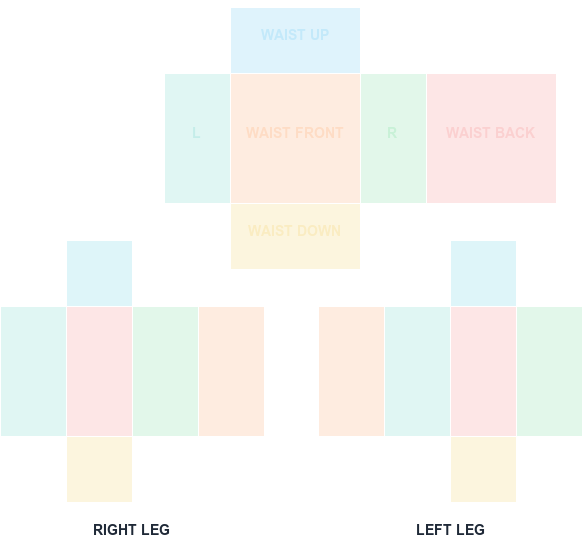
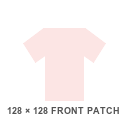
Start with a transparent, Roblox-compatible guide. Shirt and pants wrap around the avatar; the classic T-shirt is a 128×128 front patch.
585 × 559 PNG
Classic Shirt UV Template
585×559 torso and arm layout with color-coded faces.