Free Roblox shirt templates in transparent PNG format
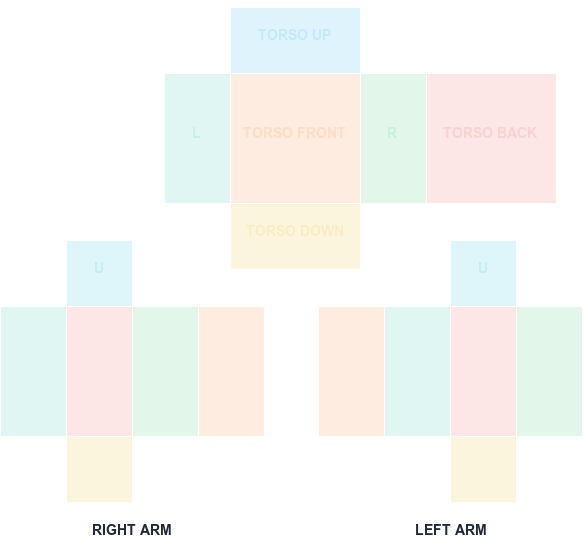
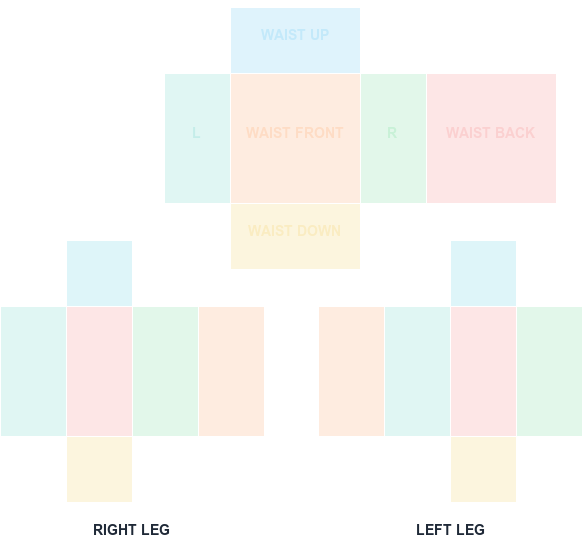
Download clean starting files without an account. The pack includes a labeled Shirt guide, Pants guide, square T-shirt canvas, and empty transparent Shirt canvas.
585 × 559 PNG
Preview and align your shirt PNG
100% in-browser
What this template is for
These blank files provide the canvas and face boundaries, not copyrighted character art or marketplace designs. Add only artwork you created or have permission to use.
How to use it
Download the closest template, duplicate it as a working file, keep the guide on a top layer, and paint underneath. Hide the guide before your final PNG export.
Step by step
1
Pick the template that matches your asset
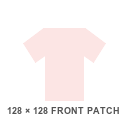
The pack covers a labeled Shirt guide, a Pants guide, a square T-shirt canvas, and a blank transparent Shirt sheet. Choosing the right one first avoids an entire wasted editing session.
2
Duplicate before you edit
Keep the original download untouched and work on a copy. When alignment goes wrong, restarting from a clean sheet is faster than undoing a long edit history.
3
Paint below the guide, then hide it
The guide layer exists to show panel boundaries during editing. It should never survive into the exported file.
4
Preview here before paying the upload fee
Every classic clothing upload costs R$10. Running the file through the previewer on this page first is free and catches the obvious mapping errors.
Sizes and upload facts
Key numbers for this template
Shirt / Pants canvas
585 × 559
The classic wrap-around clothing sheet.
Classic T-shirt
128 × 128
A single square graphic on the torso front.
Largest UV panel
128 × 128
Torso and leg front/back faces.
Upload fee
R$10
Per classic clothing asset.
Common mistakes
Treating a blank template as a finished design
These files supply the canvas and face boundaries only. They contain no artwork, so uploading one unedited produces a blank garment.
Using copyrighted artwork on a free template
The template being free does not extend to what you paint on it. Use artwork you created or have permission to use, or the asset risks moderation.
Downloading from sources that bundle watermarks
Some 'free template' sites embed watermarks or promotional text into the sheet, which then appears on the avatar.
FAQ
Questions before you upload
Can I use these Roblox shirt templates commercially?
You can use the blank layout files as a starting canvas. You remain responsible for the rights to all artwork and branding you add.
Are the downloads PNG files?
Yes. Each download is a PNG at the dimensions shown on its card.
Do free templates remove the Roblox upload fee?
No. The template and preview tools are free, but the platform upload workflow in this guide uses an R$10 fee.
Are these Roblox templates really free?
Yes, the template files download without an account or payment. Roblox itself still charges R$10 per classic clothing asset at upload time, which is separate from the template.
Do I need permission to use a free template?
The blank canvas files are yours to use. The artwork you add is what matters for moderation — only use designs you created or are licensed to use.
Why is my downloaded template blank?
The transparent Shirt canvas is intentionally empty, since it is meant for people who already know the UV positions. If you want visible panel boundaries, download the labeled guide instead.
Blank canvas files
Download a template at the right size
Start with a transparent, Roblox-compatible guide. Shirt and pants wrap around the avatar; the classic T-shirt is a 128×128 front patch.
585 × 559 PNG
Classic Shirt UV Template
585×559 torso and arm layout with color-coded faces.